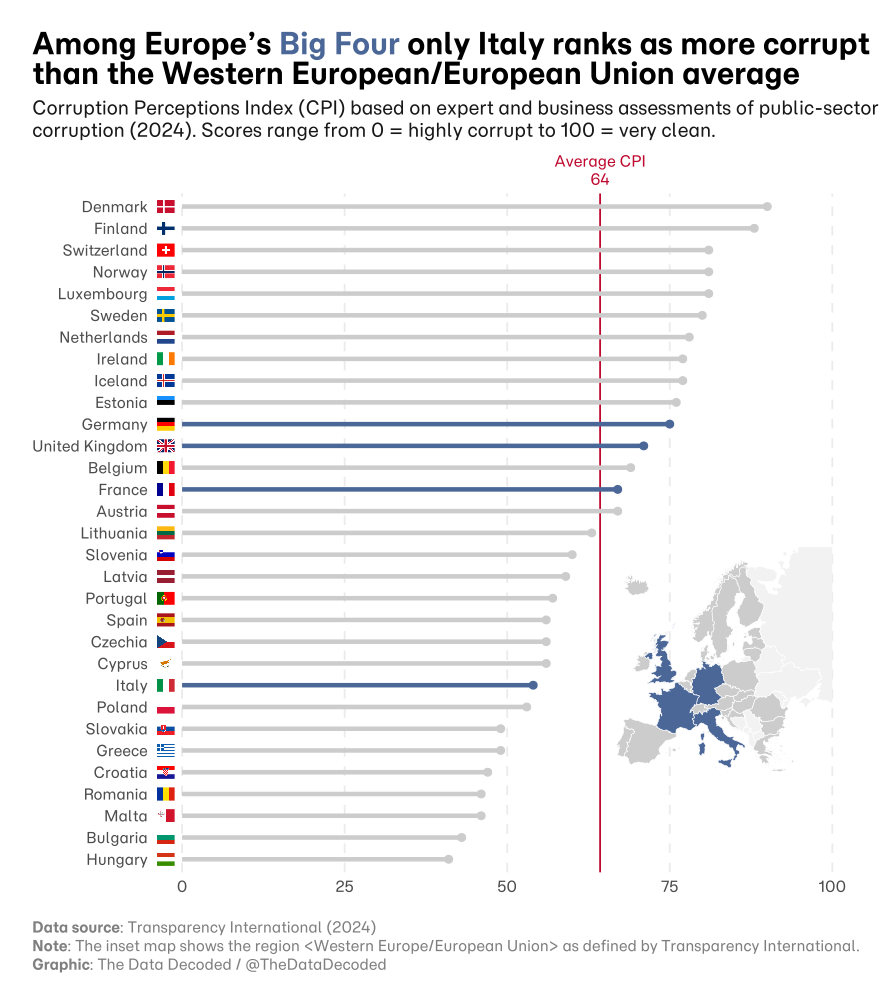
# Load packages
library(tidyverse)
library(gapminder)
library(magick)
library(purrr)
library(rsvg)
library(glue)
library(countrycode)
library(janitor)
library(httr)
library(readxl)
library(dplyr)
library(giscoR)
library(sf)
library(showtext)
library(ggtext)
library(patchwork)
library(ggimage)How to add rectangular, square or round country flags to ggplots
R
ggplot
flags
DataViz
Corruption Index
An example comparing the Corruption Perception Index Europe’s Big Four (France, Germany, UK and Italy) in 2024
Using Flags in Data Visualization
When building visualizations in ggplot2 involving international data, the temptation to replace standard axis text or points with country flags is strong. We naturally associate countries with their flags, and using them can instantly make a chart feel more personalized and engaging.
However, data visualization is a balancing act between aesthetics and clarity. While flags can add context, they can just as easily turn into “chart junk”-visual elements that clutter the message rather than enhancing it. Before importing that library of PNGs, it is important to weigh whether the flags will help your reader understand the data or just distract them from it.
Here is a quick breakdown of the trade-offs:
The Pros 🟢
Immediate Recognition: Users can often identify a flag faster than reading a text label, especially for well-known countries.
Visual Appeal: It breaks up the monotony of text and bars, making the graphic more “shareable” and eye-catching.
Space Saving: In some dense plots, a small flag icon takes up less width than writing out a long name like “United Kingdom” or “Dominican Republic.”
The Cons 🔴
Visual Clutter: High-contrast, multi-colored flags can distract the eye from the actual data trends (bars or lines).
Accessibility: Not everyone knows every flag. relying solely on them can confuse readers who aren’t geography buffs.
Technical Challenges: Flags come in different aspect ratios (some are square, some are wide rectangles), which can make alignment and consistent sizing in ggplot tricky.
Since I often find myself wanting to include flags in charts, I have written a function that downloads all the country flags for the countries included in the data frame I supply.
get_country_flags: A custom function for downloading country flags
get_country_flags has the following arguments:
.data: data frame containing a column with country names in any format (full names, iso3, etc.)country_col: data frame column containing the country namesshape: desired flag shape (options include4x3,1x1andround)white.background: should white flag color be replaced by a darker color for contrast? Defaults to TRUE (white color)dest_folder: folder where country flags should be savedoverride.stop: whether to override checks of existing flags
The country flags are downloaded from an excellent gallery by Panayiotis Lipiridis, which contains flags in both a 4x3 (rectangular) and a 1x1 (square) format. The URL paths to each flag use the ISO2 country codes. For example, the 4x3 flag for Greece is given by the URL https://flagicons.lipis.dev/flags/4x3/gr.svg. All flags are available in SVG format. Since it is not possible to add SVG images directly on ggplot charts, my function converts them into PNG format. Once the flags are added to the chart it is possible to save the entire chart in SVG format, taking advantage of the properties of that format.
The function goes through the following steps:
- Checks if
dest_folderalready exists. If not, it creates it - Pulls the unique countries mentioned in the data frame
- Detects the country format (e.g. full name, iso2, iso3, etc.), uses the
countrycodepackage to convert the names into the ISO2 code format matching the URL of the flag gallery, and adds the codes to a new column calledISO2 - Generates
country_flags, a data frame with the following columns:ISO2: each country’s ISO2 codeflag_url: path to the gallery URL for each countrypng_file_path: path for new png flag generated from the SVG flags in the gallery
- Defines and uses
circular_crop_and_save, another function which actually downloads the images from the gallery. First, the function checks which flag shape is desired and whether the white flag color should be changed to a different color. It then downloads either the 4x3 or 1x1 flags. Ifshape = round, it download the 1x1 flags and crops them into a circular shape.circular_crop_and_saveis iterated through thecountry_flagslist.
Reproducible example
Below I present an example of how to download country flags and add them to a ggplot chart. There is bonus inset map as well.
# Set project path
project_path <- file.path("visuals", "2025-12-import-flags-ggplot")
# Definition of 'get_country_flags' function
get_country_flags <- function(.data, # data frame
country_col, # column containing countries
shape, # desired flag shape
white.background = TRUE, # Preserve white color? If not, specify new color
dest_folder = paste0(project_path, "/data/country_flags"), # where flags should be saved
override.stop = FALSE
){
# Update path based on flag shape. Flags of different shapes are stored in different folders
dest_folder <- file.path(dest_folder, shape)
# Create 'dest_folder' if it does not exist yet
if (!dir.exists(dest_folder)) {
dir.create(dest_folder, recursive = TRUE, showWarnings = FALSE)
message(paste0("'", dest_folder, "'", " was created"))
} else {
message(paste("Folder", dest_folder, "already exists"))
}
# Check whether flags need to be cropped to square (1x1 or round flags)
if (shape %in% c("1x1", "round")) {
flag_format <- "1x1"
} else {
flag_format <- "4x3"
}
# Store data frame as 'df'
df <- .data
# Get list of distint countries
country_list <- df %>% distinct(.data[[country_col]]) %>% pull()
# Guess the code/name of a vector
field_guess <- guess_field(country_list)
best_guess <- field_guess[1,"code"]
print(best_guess) # print top match
# If the guess is any type of "name" (cow.name, country.name.en, etc.),
# we force the origin to be 'country.name'.
# This enables the package's powerful Regex/Fuzzy matching.
# If we leave it as 'cow.name', it attempts strict exact matching and fails on typos.
if (grepl("name", best_guess, ignore.case = TRUE)) {
valid_origin <- "country.name"
message("Detected a name format. Switching origin to 'country.name' for better matching.")
} else {
valid_origin <- best_guess
}
# Add ISO2 and ISO3 column to data frame if it does not already exist
if (!grepl("iso2", best_guess, ignore.case = TRUE)) {
df <- df %>% mutate(ISO2 = countrycode(.data[[country_col]],
origin = valid_origin,
destination = "iso2c"),
ISO3 = countrycode(.data[[country_col]],
origin = valid_origin,
destination = "iso3c"))
}
# Create data frame of country flags to be downloaded, generate URL path and file path
country_flags <- tibble(ISO2 = unique(df$ISO2),
ISO3 = unique(df$ISO3),
country_territory = unique(df$country_territory),
flag_url = paste0("https://flagicons.lipis.dev/flags/",
flag_format, "/",
tolower(ISO2),
".svg"),
png_file_path = paste0(file.path(dest_folder, tolower(ISO2)),
".png") # add PNG destination
)
# Check if flags have already been downloaded and processed. If yes, step is skipped
missing_flags <- country_flags %>% filter(!file.exists(png_file_path)) %>% pull(png_file_path)
if (length(missing_flags) == 0 & override.stop == FALSE){
message("Flags are already availabe. Use 'override.stop == TRUE' if you want to download anyway")
return(country_flags)
} else {
# ---------- Main processing function ----------
# Render 4:3 SVG flag -> (optional) recolor exact whites in SVG -> square crop -> circular mask -> PNG
circular_crop_and_save <- function(
iso2_code, url, dest_path,
px = 1400,
white_hex = white.background, # e.g. "#EEEEEE" to recolor exact whites in the SVG
replace_stroke = FALSE # set TRUE if you also want white strokes recolored
) {
# 1) Load SVG text from URL
svg_text <- paste(readLines(url, warn = FALSE), collapse = "\n")
# 2) Optionally recolor exact white tokens in the SVG
if (!isTRUE(white_hex)) {
# Replace exact white fills (and optionally strokes) in raw SVG text
recolor_svg_white <- function(svg_text, new_hex = white.background, replace_stroke = FALSE) {
col <- toupper(new_hex)
if (!grepl("^#", col)) col <- paste0("#", col)
# Build patterns: attribute forms (fill="white"), (stroke="#fff") and style forms (fill:#fff;)
parts <- c("fill", if (replace_stroke) "stroke" else NULL)
attr_pat <- sprintf("(?i)\\b(%s)\\s*=\\s*\"\\s*(?:#fff(?:fff)?|white)\\s*\"",
paste(parts, collapse="|"))
attr_rep <- sprintf("\\1=\"%s\"", col)
style_pat <- sprintf("(?i)\\b(%s)\\s*:\\s*(?:#fff(?:fff)?|white)\\b", paste(parts, collapse="|"))
style_rep <- sprintf("\\1:%s", col)
# Apply both replacements
out <- gsub(attr_pat, attr_rep, svg_text, perl = TRUE)
out <- gsub(style_pat, style_rep, out, perl = TRUE)
out
}
# Apply recolor function to replace white color
svg_text <- recolor_svg_white(svg_text, new_hex = white_hex, replace_stroke = replace_stroke)
}
# 3) Rasterize the (possibly modified) SVG at 4:3
raw_png <- rsvg_png(charToRaw(svg_text), width = px, height = round(px * 3/4))
img <- image_read(raw_png)
# 4) Centered square crop (uses full height for 4:3)
if (!shape %in% c("4x3", "1x1", "round")) { stop("Unknown 'shape' specified. Choose between '4x3', '1x1' or 'round'") }
if (shape == "round") {
# 1) Make a circular (white) mask as SVG and rasterize it
.make_circle_mask <- function(d_px) {
svg <- glue(
"<svg xmlns='http://www.w3.org/2000/svg' width='{d_px}' height='{d_px}' viewBox='0 0 {d_px} {d_px}'>
<rect width='100%' height='100%' fill='black'/>
<circle cx='{d_px/2}' cy='{d_px/2}' r='{d_px/2}' fill='white'/>
</svg>"
)
image_read(rsvg_png(charToRaw(svg), width = d_px, height = d_px))
}
info <- image_info(img)
d <- min(info$width, info$height)
x_off <- floor((info$width - d) / 2)
y_off <- floor((info$height - d) / 2)
square <- image_crop(img, sprintf("%dx%d+%d+%d", d, d, x_off, y_off))
mask <- .make_circle_mask(d)
circ <- image_composite(square, mask, operator = "CopyOpacity")
image_write(circ, path = dest_path, format = "png")
} else if (shape == "1x1"){
info <- image_info(img)
d <- min(info$width, info$height)
x_off <- floor((info$width - d) / 2)
y_off <- floor((info$height - d) / 2)
square <- image_crop(img, sprintf("%dx%d+%d+%d", d, d, x_off, y_off))
image_write(square, path = dest_path, format = "png")
} else if (shape == "4x3") {
image_write(img, path = dest_path, format = "png")
}
}
# Iterate through images to download them and apply function
purrr::pwalk(country_flags, function(ISO2, flag_url, png_file_path, ...) {
circular_crop_and_save(
iso2_code = ISO2,
url = flag_url,
dest_path = png_file_path,
px = 1600,
white_hex = white.background,
replace_stroke = FALSE
)
})
# Return 'country_flags' which will be used in the ggplot
return(country_flags)
}
}# --- Configuration ---
download_url <- "https://images.transparencycdn.org/images/CPI2024_Results-and-trends.zip"
zip_filename <- "CPI2024_Results-and-trends.zip"
# Where the data should be extracted and saved
extract_dir <- file.path(project_path, "data")
excel_file_in_zip_pattern <- "CPI2024_Results and trends.xlsx"
# Define the full path to the final, imported Excel file
final_excel_path <- file.path(extract_dir, excel_file_in_zip_pattern)
# --- CONDITIONAL CHECK: Only proceed if the final data file is MISSING ---
if (!file.exists(final_excel_path)) {
message("--- Starting Data Download and Import ---")
# --- 1. Download the ZIP file ---
message("1. Downloading the ZIP file...")
response <- GET(download_url,
write_disk(path = zip_filename, overwrite = TRUE))
if (http_status(response)$category == "Success") {
message(" ✅ Download complete.")
} else {
stop(paste(" ❌ Download failed with status:", http_status(response)$reason))
}
# --- 2. Extract the ZIP file ---
message("2. Extracting the ZIP file...")
if (!dir.exists(extract_dir)) {
dir.create(extract_dir)
}
unzip_status <- unzip(zip_filename,
exdir = extract_dir,
overwrite = TRUE)
if (length(unzip_status) > 0) {
message(paste(" ✅ Extracted", length(unzip_status), "files to:", extract_dir))
} else {
stop(" ❌ Extraction failed. Check if the ZIP file is valid.")
}
# Clean up the downloaded ZIP file
file.remove(zip_filename)
} else {
# This message will display if the file is found and we skip the download/extract steps
message(paste("--- 🔔 Skipping download: Data file found at", final_excel_path, "---"))
}
# --- 3. Import the Excel Data (Always Run) ---
# We always import the data to make sure the 'cpi_data' object is available
# in the R session, regardless of whether it was downloaded/extracted this time.
# Find the exact Excel filename matching the pattern inside the directory
excel_filename <- list.files(extract_dir, pattern = excel_file_in_zip_pattern, full.names = FALSE)[1]
excel_path <- file.path(extract_dir, excel_filename)
message(paste("3. Importing data from:", excel_filename))
cpi_data <- read_excel(
path = excel_path,
sheet = "CPI Historical",
skip = 2,
col_names = TRUE
)
message(" ✅ Data successfully imported into 'cpi_data'.")
rm(list = ls()[!ls() %in% c("cpi_data", "project_path", "get_country_flags")])# Clean names
cpi_data <- cpi_data %>% clean_names()
# Convert categorical variables to factors
cpi_data <- cpi_data %>% mutate(across(
.cols = c(country_territory, iso3, region),
.fns = factor
))
# Set main colors
big_four_col <- "#4a6798"
other_col <- "grey80"
# filter for 'WE/EU' region and year = 2024 and create color and country groupings
cpi_data_europe_2024 <- cpi_data %>% filter(region == "WE/EU", year == 2024) %>%
mutate(country_territory = fct_reorder(country_territory, cpi_score),
country_territory = fct_drop(country_territory),
country_color = case_when(
country_territory %in% c("United Kingdom", "Germany", "France", "Italy") ~ big_four_col,
.default = other_col
),
country_group = case_when(
country_territory %in% c("United Kingdom", "Germany", "France", "Italy") ~ "big_four",
.default = "other"
))
# Calculate regional average CPI score
cpi_data_europe_2024_average <- cpi_data_europe_2024 %>% summarise(mean_cpi = mean(cpi_score)) %>% pull()# Get the countries boundaries
europe_sf <- gisco_get_countries(resolution = "3", region = "Europe")
# "Target" countries
target_countries <- c("France", "United Kingdom", "Italy", "Germany")
# Other WE/EU countries
we_eu_countries <- cpi_data_europe_2024 %>%
filter(!country_territory %in% c("France", "United Kingdom", "Italy", "Germany")) %>% pull(country_territory)
# Create country groupings
europe_sf <- europe_sf %>%
mutate(
# Clean up giscoR names if needed or match by ISO code (CNTR_ID)
status = case_when(
NAME_ENGL %in% target_countries ~ "big_four",
NAME_ENGL %in% we_eu_countries ~ "WE/EU",
TRUE ~ "Rest" # Everything else (Russia, Belarus, Balkans, etc.)
)
)
crs_longlat <- "+proj=longlat +datum=WGS84 +no_defs"
crs_lambert <- "+proj=laea +lat_0=52 +lon_0=10 x_0=4321000 y_0=321000 +datum=WGS84 +units=m +no_defs"
europe_laea <- st_transform(europe_sf, crs = "+proj=laea")
get_bbox <- function(){
bb <- st_sfc(
st_polygon(list(
cbind(
c(-10.6, 33.0, 33.0, -10.6, -10.6),
c(32.5, 32.5, 71.05, 71.05, 32.5)
))), crs = crs_longlat
) %>% st_transform(crs = crs_lambert) %>%
st_bbox()
return(bb)
}
bb <- get_bbox()
# Create inset map
map_inset <- ggplot(europe_laea) +
geom_sf(aes(fill = status), color = "white", size = 0.2) +
# Define the specific colors
scale_fill_manual(
values = c(
"big_four" = big_four_col, # Your specified blue
"WE/EU" = other_col, # Your specified grey
"Rest" = "grey95" # Very light grey for context
)
) +
# Zoom in on Europe (Camera view)
coord_sf(crs = crs_lambert,
xlim = c(bb["xmin"], bb["xmax"]),
ylim = c(bb["ymin"], bb["ymax"])
) +
theme_void() +
theme(legend.position = "none",
panel.background = element_rect(fill = "transparent", color = NA),
plot.background = element_rect(fill = "transparent", color = NA))# Run function to download flags of desired shape and white color replacement
#############
# ---1. 'Round' flags, white color replaced by light grey
country_flags_round <- get_country_flags(.data = cpi_data_europe_2024,
country_col = "iso3",
shape = "round",
white.background = "#EEEEEE")
# Add coordinates for flag mapping in ggplot
country_flags_round <- country_flags_round %>% mutate(x_pos = -2.5, y_pos = as.numeric(country_territory))
#############
# ---2. '1x1' flags, white color replaced by light grey
country_flags_square <- get_country_flags(.data = cpi_data_europe_2024,
country_col = "iso3",
shape = "1x1",
white.background = "#EEEEEE")
# Add coordinates for flag mapping in ggplot
country_flags_square <- country_flags_square %>% mutate(x_pos = -2.5, y_pos = as.numeric(country_territory))
#############
# ---3. '4x3' flags, white color unchanged
country_flags_rect <- get_country_flags(.data = cpi_data_europe_2024,
country_col = "iso3",
shape = "4x3",
white.background = TRUE)
# Add coordinates for flag mapping in ggplot
country_flags_rect <- country_flags_rect %>% mutate(x_pos = -2.5, y_pos = as.numeric(country_territory))# Choose default font
font_choice <- "Momo Trust Sans"
# Load Google Fonts into 'sysfonts'
font_add_google(font_choice, db_cache = FALSE)
# Automatically use 'showtext' for new graphics devices
showtext_auto()p <- ggplot(data = cpi_data_europe_2024, aes(x = cpi_score, y = country_territory)) +
geom_vline(xintercept = cpi_data_europe_2024_average, color = "#BF0A30") +
geom_segment(aes(x = 0, y = country_territory, xend = cpi_score, yend = country_territory,
color = country_color),
linewidth = 1.6) +
geom_point(aes(color = country_color), size = 2.3) +
scale_color_identity() +
scale_x_continuous(breaks = seq(0, 100, by = 25), expand = expansion(mult = c(0.04, 0))) +
coord_cartesian(xlim = c(0, 100),
ylim = c(1, length(levels(cpi_data_europe_2024$country_territory))),
clip = "off") +
theme_minimal(base_family = font_choice, base_size = 14) +
theme(panel.grid.major.x = element_line(linetype = 2),
panel.grid.minor.x = element_blank(),
panel.grid.major.y = element_blank(),
panel.grid.minor.y = element_blank(),
axis.title.x = element_blank(),
axis.title.y = element_blank(),
plot.title.position = "plot",
plot.title = element_markdown(hjust = 0, face = "bold", margin = margin(b = 5),
lineheight = 1, size = rel(1.6)), # left-align title
plot.subtitle = element_markdown(hjust = 0, margin = margin(t = 3, b = 40),
size = rel(1), lineheight = 1.2,
color = "#181818"), # left-align subtitle
plot.caption.position = "plot",
plot.caption = element_markdown(hjust = 0, vjust = 0, colour = "grey50",
margin = margin(t = 20), lineheight = 1.25),
plot.margin = margin(t = 18.5, r = 40, b = 13.6, l = 18.5, unit = "pt")) +
labs(x = NULL, y = NULL,
title = paste0("Among Europe's <span style='color: #4a6798;'>Big Four</span> only Italy ranks as more corrupt",
"<br>", "than the Western European/European Union average"),
subtitle = paste0("Corruption Perceptions Index (CPI) based on expert and business assessments of ",
"public-sector", "<br>", "corruption (2024). Scores range from 0 = highly corrupt to 100 = very clean."),
caption = paste0("<b>Data source</b>: Transparency International (2024)", "<br>",
"<b>Note</b>: The inset map shows the region <Western Europe/European Union> as defined by Transparency International.", "<br>",
"<b>Graphic</b>: The Data Decoded / @TheDataDecoded")
) +
geom_richtext(data = tibble(x = cpi_data_europe_2024_average,
y = length(levels(cpi_data_europe_2024$country_territory))*1.052,
label = paste0("Average CPI<br>", round(cpi_data_europe_2024_average, 0))),
aes(x = x, y = y, label = label),
inherit.aes = FALSE,
hjust = 0.5,
family = font_choice,
size = 4,
colour = "#BF0A30",
fill = NA,
label.colour = NA
)Round flags with white background switched to light grey
p_round <- p + geom_image(
          data = country_flags_round, # Only contains 'Europe' row
          aes(x = x_pos, y = y_pos, image = png_file_path),
          size = 0.026,
          asp = 1,
          inherit.aes = FALSE
        ) +
    inset_element(
                map_inset,
                left   = 0.645,   # center the inset horizontally
                right  = 1,
                bottom = 0.05,   # move it toward the top
                top    = 0.55,
                align_to = "panel"
        )

svg_path <- file.path(project_path, "plots", "thumb.svg")

svg_w <- 9.3
svg_h <- 10.4

png_w <- 2000
png_h <- round(png_w * svg_h / svg_w)  # keep same aspect ratio

ggsave(svg_path, p_round, width = svg_w, height = svg_h)

library(rsvg)

png_path <- file.path(project_path, "plots", "corruption_index_big_four_round.png")

rsvg_png(
  svg  = svg_path,
  file = png_path,
  width  = png_w,
  height = png_h
)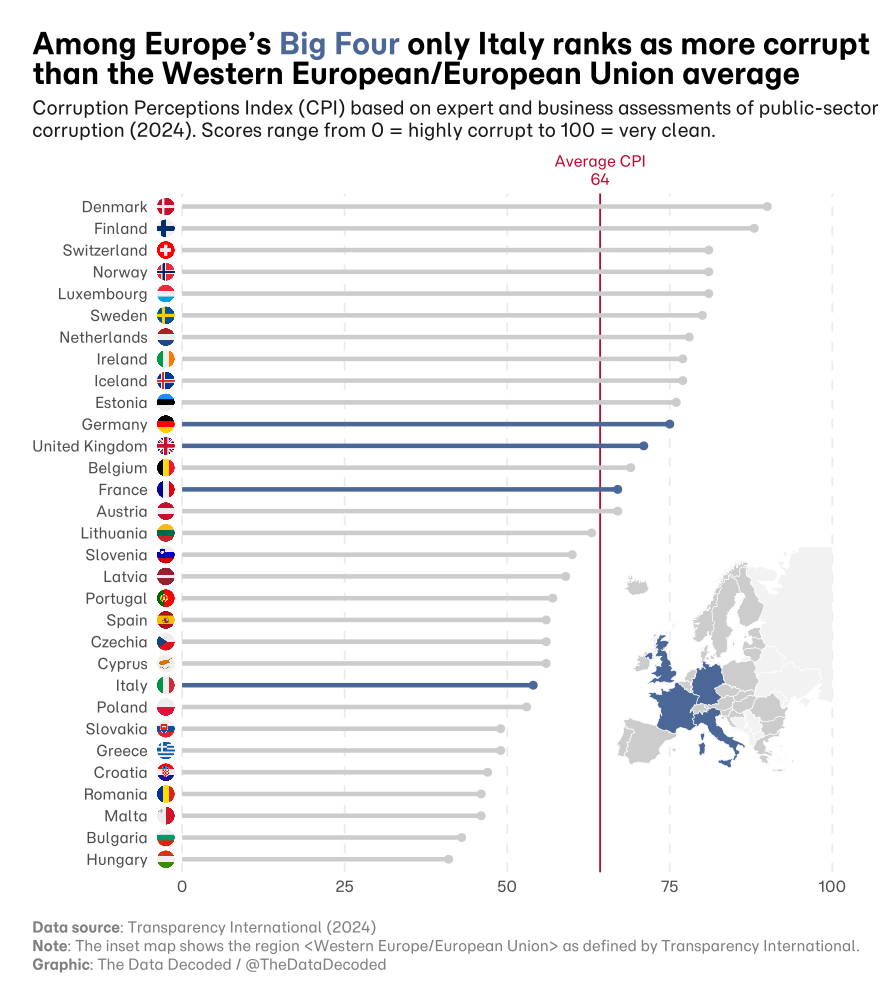
Square flags with white background switched to light grey
p_square <- p + geom_image(
          data = country_flags_square, # Only contains 'Europe' row
          aes(x = x_pos, y = y_pos, image = png_file_path),
          size = 0.026,
          asp = 1,
          inherit.aes = FALSE
        ) +
    inset_element(
                map_inset,
                left   = 0.645,   # center the inset horizontally
                right  = 1,
                bottom = 0.05,   # move it toward the top
                top    = 0.55,
                align_to = "panel"
        )

svg_path <- file.path(project_path, "plots", "corruption_index_big_four_square.svg")

svg_w <- 9.3
svg_h <- 10.4

png_w <- 2000
png_h <- round(png_w * svg_h / svg_w)  # keep same aspect ratio

ggsave(svg_path, p_square, width = svg_w, height = svg_h)

library(rsvg)

png_path <- file.path(project_path, "plots", "corruption_index_big_four_square.png")

rsvg_png(
  svg  = svg_path,
  file = png_path,
  width  = png_w,
  height = png_h
)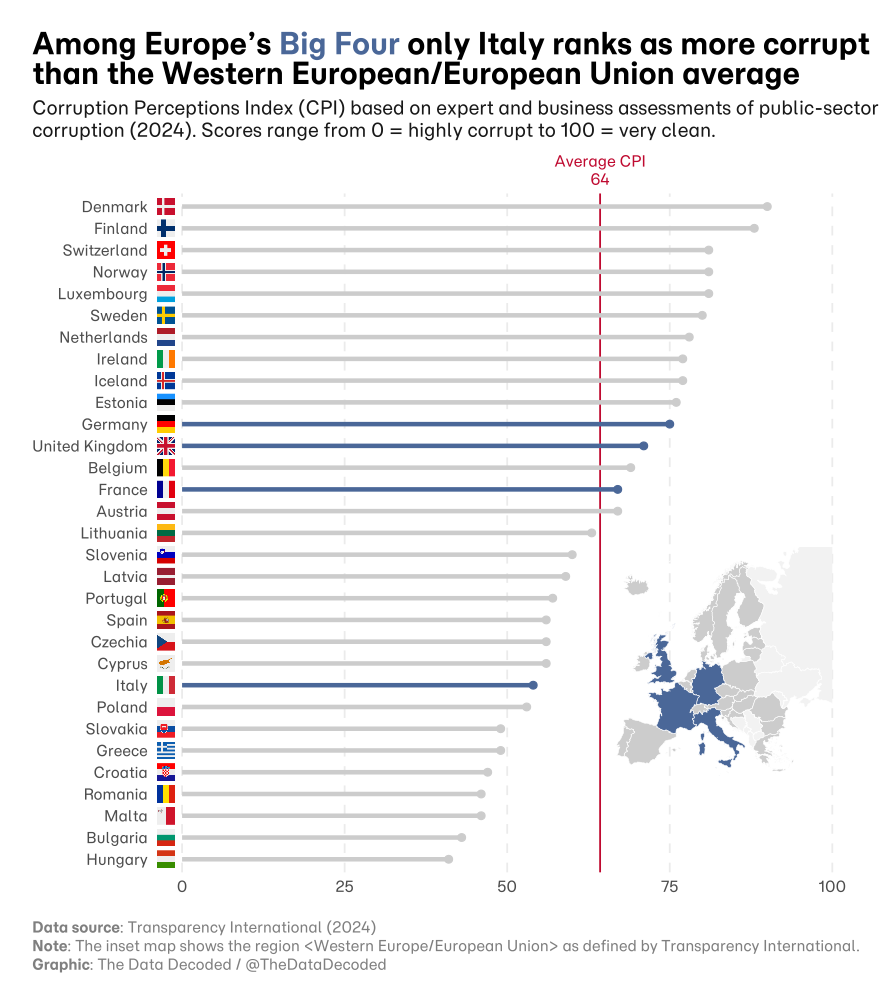
Rectangular flags with white background preserved
p_rect <- p + geom_image(
          data = country_flags_rect, # Only contains 'Europe' row
          aes(x = x_pos, y = y_pos, image = png_file_path),
          size = 0.026,
          asp = 1,
          inherit.aes = FALSE
        ) +
    inset_element(
                map_inset,
                left   = 0.645,   # center the inset horizontally
                right  = 1,
                bottom = 0.05,   # move it toward the top
                top    = 0.55,
                align_to = "panel"
        )

svg_path <- file.path(project_path, "plots", "corruption_index_big_four_rect.svg")

svg_w <- 9.3
svg_h <- 10.4

png_w <- 2000
png_h <- round(png_w * svg_h / svg_w)  # keep same aspect ratio

ggsave(svg_path, p_rect, width = svg_w, height = svg_h)

library(rsvg)

png_path <- file.path(project_path, "plots", "corruption_index_big_four_rect.png")

rsvg_png(
  svg  = svg_path,
  file = png_path,
  width  = png_w,
  height = png_h
)